
Owll for Apple Watch — Record Any Conversation Without Your Phone
By Owll Team · September 10, 2026 · 7 min read
You’re walking to grab coffee with your manager. A big idea lands mid-stride.
Or you’re standing at a whiteboard with the team, scribbling faster than you can think.
Or you’re in a candid 1:1 — the kind where pulling out your laptop would kill the vibe entirely.
These are the moments that matter most. And they’re exactly the moments most AI meeting recorders miss.
Today, that changes. Owll is now available on Apple Watch.
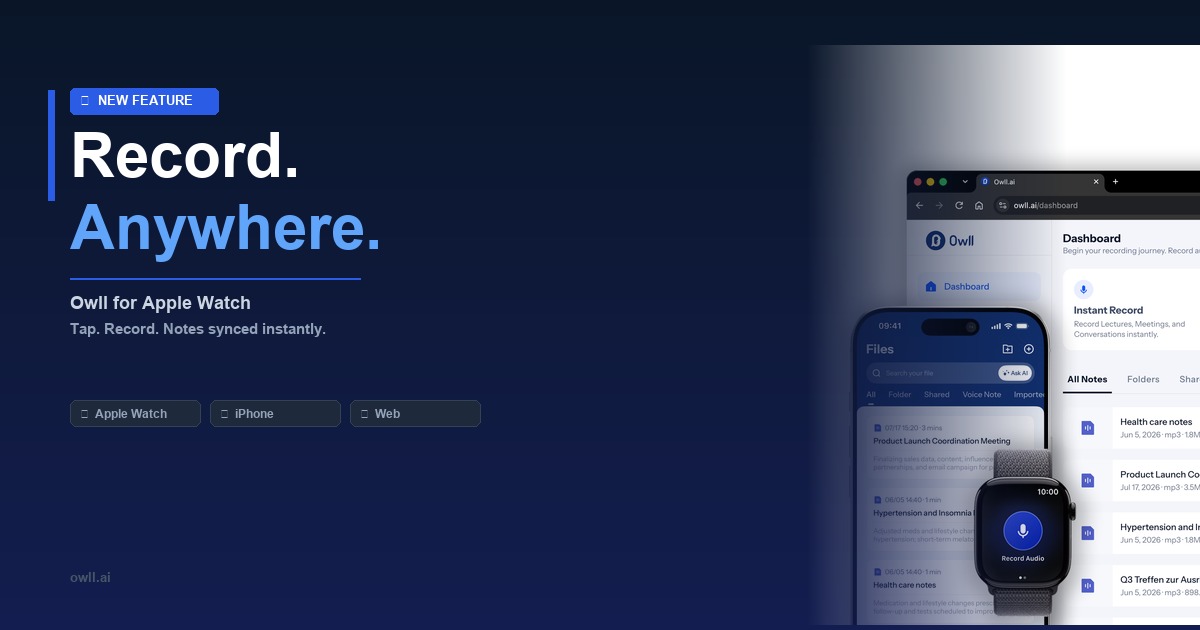
One tap on your wrist. Owll starts capturing every word. Your AI-generated summary is waiting on your iPhone and your browser before you’re back at your desk.
Why Apple Watch? (The Problem We’re Solving)
Most AI meeting recorders were built for one scenario: a video call on your laptop. But some of the most valuable conversations in your day happen away from a screen:
- A feedback session on a walk
- A quick hallway sync that turns into a strategic decision
- A client lunch where you can’t exactly open Otter mid-bite
- A lecture, workshop, or panel where your phone on the table is distracting
Until now, you had two options: miss the details, or disrupt the moment by pulling out your phone.
Owll for Apple Watch gives you a third option: stay present, and still capture everything.
How It Works — Tap, Talk, Done
- Install Owll on your iPhone → the Watch app installs automatically
- Add Owll as a complication on your watch face (one-tap access, always visible)
- Tap the complication to start recording — the Owll icon pulses to confirm it’s live
- Have your conversation — no phone in hand, no laptop open, no awkward setup
- Tap again to stop — Owll processes the audio and generates your AI summary
- Open Owll on iPhone or web — your full notes, action items, and summary are ready
⌚ Requires: watchOS 11 or later · iPhone with Owll app installed · Active Owll account
Instant Sync: iPhone + Web
Everything captured on Apple Watch flows directly into your Owll account:
| Platform | What You Get |
|---|---|
| Apple Watch | Tap to record, live status indicator |
| iPhone | Full transcript + AI summary + action items |
| Web (owll.ai) | Searchable notes, edit, share, export |
| Zoom / Teams / Meet | Notes from Watch sessions alongside your online meeting notes |
Your notes don’t live in a silo. Whether you recorded on your wrist, on a video call, or via the iPhone mic, everything is searchable and organized in one place.
Who Is This Built For?
🏃 People Who Move Between Meetings All Day
Managers, executives, and field sales reps: if your calendar is back-to-back and you’re walking between rooms or buildings, you need a recorder that keeps up with you.
🎤 Consultants and Coaches
You meet clients in person. You can’t take notes and be present at the same time. Owll on Apple Watch removes that trade-off — you stay focused on the person, Owll handles the documentation.
🎓 Students and Researchers
In a lecture or seminar, a glowing laptop is a distraction for everyone. Your Watch is invisible. Owll is silent. Your notes will be complete.
🤝 Sales Professionals
From a client dinner to a product demo at their office, Owll captures objections, requirements, and commitments — so your CRM update writes itself.
🧠 ADHD & Focus-First Users
For anyone who struggles to split attention between listening and note-taking: Listen fully. Owll writes for you.
Record Without Being Disruptive
- Opening a laptop signals formality — it can make people guarded
- Phone on the table is distracting — people wonder if you’re texting
- A tap on your wrist reads as checking the time — and the conversation flows naturally
💡 Transparency tip: A simple “I use an AI note-taker to make sure I don’t miss anything” is all it takes. Most people appreciate it.
5 Scenarios Where Apple Watch Recording Changes Everything
1. The Walking 1:1
Your manager prefers walking meetings. Tap Owll before you head out. Your debrief writes itself.
2. The Whiteboard Session
Everyone’s standing, ideas bouncing. Let Owll capture every idea while you focus on the whiteboard.
3. The Client Coffee
Owll’s discreet wrist recording means you’re fully in the conversation — and fully documented.
4. The Conference Hallway Chat
Some of the best conversations at events happen between sessions. Now you have it on record.
5. The Lecture or Workshop
Owll transcribes everything and gives you a clean summary — so your notes are actually useful to study from.
Owll vs. Recording on Your Phone
| Owll on Apple Watch | Phone on the Table | |
|---|---|---|
| Attention signal | Neutral (looks like checking time) | Distracting |
| Setup time | 1 tap | Unlock → open app → tap record |
| Hands | Fully free | Phone occupies attention |
| Social vibe | Natural | Slightly formal / awkward |
| Note quality | AI summary + transcript | Same — Owll handles both |
| Sync | Instant to iPhone + web | Instant to web |
Privacy & Recording Consent
- Always inform the other party before recording — legally required in many regions
- Audio is discarded after transcription by default
- All data is encrypted in transit and at rest
- You control who can view or export your notes
See our guide: Is It Legal to Record a Conversation?
Get Started with Owll for Apple Watch
Step 1: Download Owll on the App Store
Step 2: Open Owll on iPhone → tap “Set up Apple Watch”
Step 3: Add Owll as a watch face complication
Step 4: Tap your wrist. Start your next great conversation.
Your Wrist. Your Notes. Zero Interruption.
Start recording any conversation with one tap. AI-generated notes sync to iPhone and web instantly.
Frequently Asked Questions
Does Owll for Apple Watch work without my iPhone nearby?
Recording works standalone on the Watch. The AI summary and sync require an iPhone connection (Bluetooth or Wi-Fi) to process and upload.
What happens to the audio after transcription?
Audio is processed and then discarded by default. You can adjust retention settings in your Owll account.
Can I use Owll Watch for Zoom, Teams, or Google Meet calls?
Owll Watch is designed for in-person conversations. For video calls, use Owll’s browser extension or desktop app — notes appear in the same unified dashboard.
What Apple Watch models are supported?
Any Apple Watch running watchOS 11 or later (Series 6 and newer).
Is there a recording length limit?
Free accounts support up to 60 minutes per session. Pro and Team plans offer unlimited recording length.
Does the other person need to know I’m recording?
Yes — always inform the other party. Owll is designed to help you be a better listener, not a covert recorder.