Claude
Recall meeting decisions.
Owll MCP
Owll MCP lets ChatGPT, Claude, and more search notes from meetings, interviews, lectures, voice memos, and uploads. Open the source behind each answer.
Read-only · Free to connect
 Owll MCP Owll connected
Focus on onboarding. Review the beta Thursday. Maya owns the launch checklist.
Works with your AI tools
Use Owll MCP in supported AI tools and connectors.
Recall meeting decisions.
Search your Owll library.
Find conversation context.
Check source details.
Recall project notes.
Find team decisions.
Access your notes.
Search your notes.
Find next steps.
Recall work context.
Availability and setup vary by platform. Owll MCP reads notes; it cannot edit them.
Mac · iOS · Android · Web
Capture on Mac or mobile. Review on web. Search everything with AI.
Record calls as you work.
Get Mac appSave conversations on the go.
Get iOS appSave ideas and conversations.
Get Android appReview notes in your browser.
Open web appHow Owll works
Owll's MCP server brings notes from meetings, interviews, lectures, voice memos, and uploads to your AI tools. Search transcripts, summaries, and action items without copying files.
Add calls, lectures, interviews, and voice memos.
Get searchable text.
See decisions and action items.
Find what you need.
Use the answer and its source.
Why connect Owll?
Find what was said, who owns the next step, and where it came from.
Find meetings, interviews, lectures, and voice notes.
Check the original note.
Read-only access keeps your notes in Owll.
Try it
See how a question leads back to the source note.
Owll MCP Owll connectedFocus on onboarding. Review the beta Thursday. Maya owns the launch checklist.
Watch Owll MCP
Watch captured audio become notes you can ask about.
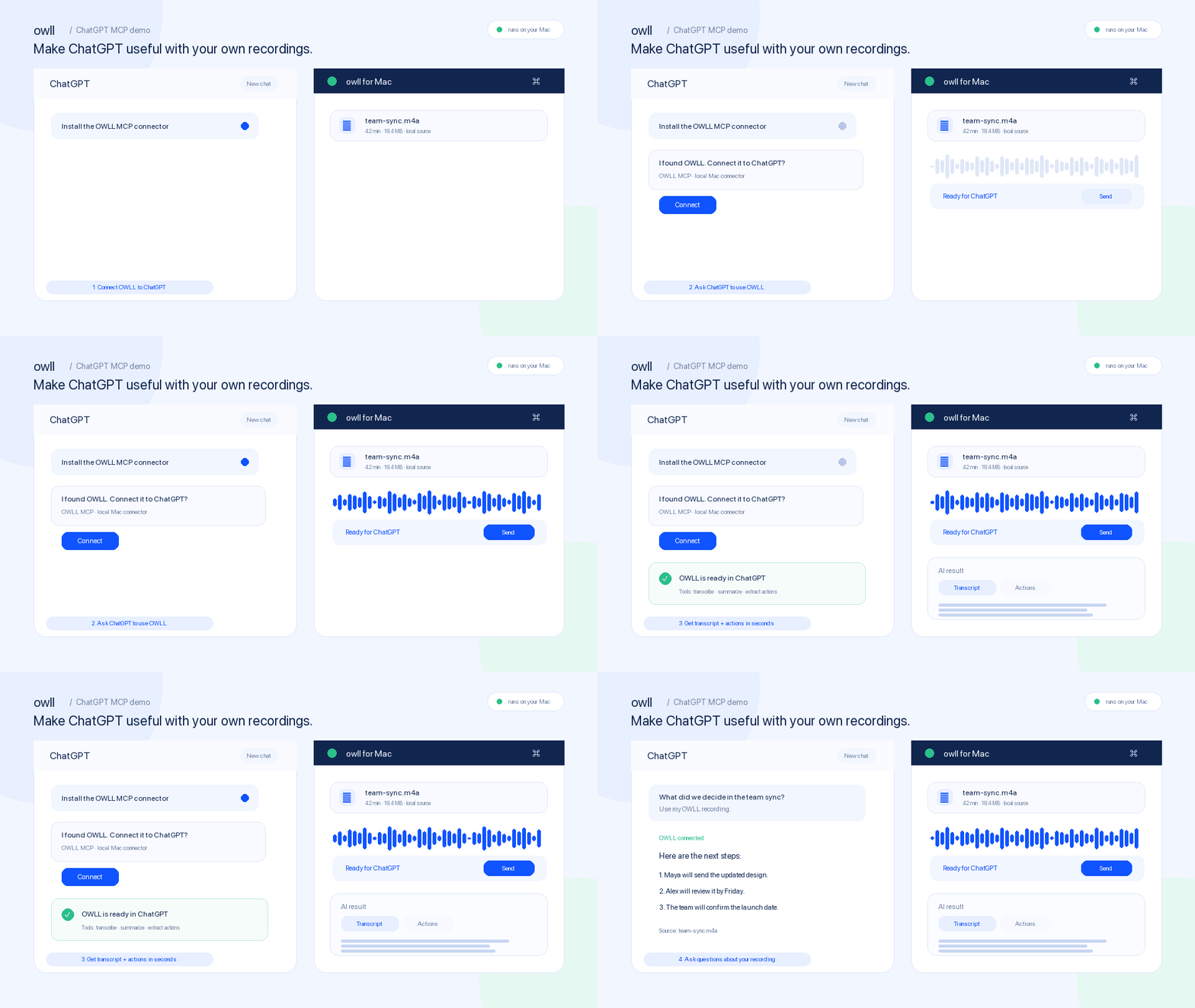
Three steps
MCP connects your Owll library to compatible AI tools.
Go to its MCP or connector settings.
Choose Owll or add the server URL below, then sign in.
Find details, decisions, and action items.
https://mcp.owll.ai/mcp
Update onboarding. Review Thursday. Maya owns the launch checklist.
Ask about this meeting.
Focus on onboarding. Review the new flow Thursday.
Weekly product sync · source noteOwll for Mac
Record or upload audio. Get a transcript, summary, and next steps you can find with AI.
Read-only access
Authorize access to search your notes. Connected AI tools cannot edit or delete them.
FAQ
Owll MCP is a read-only connection that lets compatible AI tools search your Owll notes, transcripts, summaries, and action items.
Explore Owll
Capture, upload, transcribe, and find every important detail.
Get started
Capture or upload with Owll. Connect your AI tool. Ask about your notes.