
Never Take Notes Again: How AI Captures Every Word for You
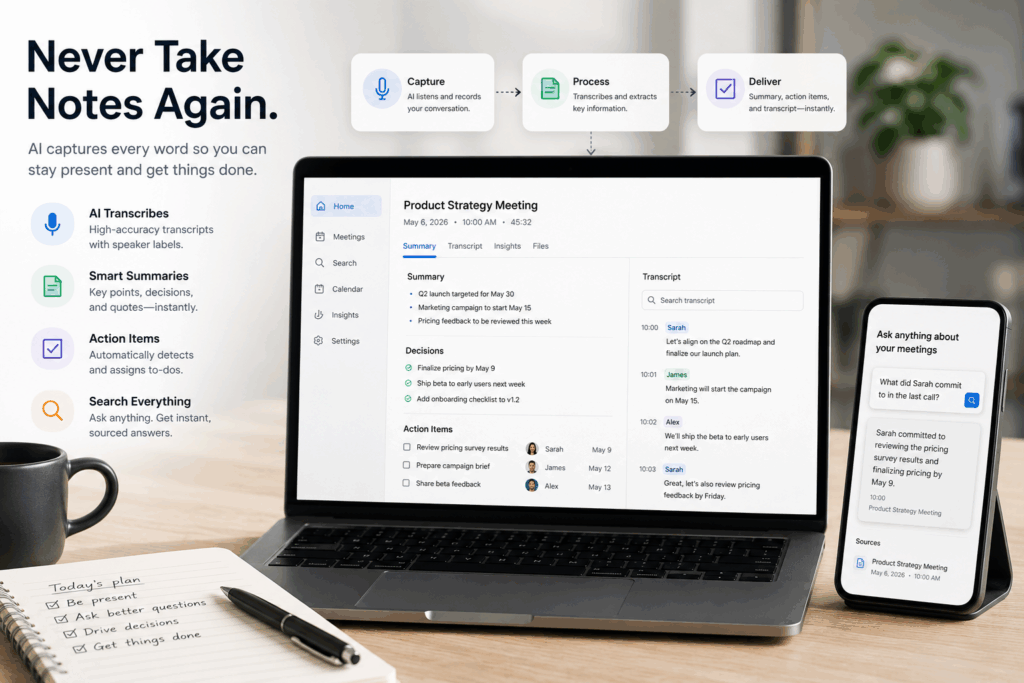
Never take notes again — discover how AI note takers like Owll.ai automatically transcribe, summarize, and turn meetings, lectures, and calls into action items in 2026.
Why people are saying “never take notes again” in 2026
If you’ve ever scribbled half a sentence while trying to follow what your boss just said — and missed both — you already know the problem. Manual note-taking forces your brain to do two jobs at once: listen and document. You end up doing neither well. That listen-or-document tradeoff is exactly what Owll.ai removes — by handling the writing for you in the background, so your brain only has one job.
In 2026, this is no longer necessary. Owll.ai is an AI note-taker that records, transcribes, and summarizes meetings, lectures, and calls automatically, then delivers a clean recap with action items before you even close the call. Owll.ai turns every conversation — Zoom, Google Meet, Microsoft Teams, in-person, or YouTube — into a searchable transcript, structured summary, and tracked action items in one place. The phrase “never take notes again” has become the rallying cry of an entire category of productivity tools — and for good reason. According to Atlassian’s State of Teams 2024 report, an estimated 25 billion work hours are lost to ineffective collaboration each year within the Fortune 500.
This guide explains exactly how it works, who it’s for, and the seven things to look for before you pick a tool.
What does “never take notes again” actually mean?
It means a piece of software listens to your conversation — on Zoom, Google Meet, Microsoft Teams, a phone call, an in-person meeting, or even a YouTube lecture — and produces three things automatically:
- A full searchable transcript of who said what, time-stamped.
- A structured summary with key points, decisions, and quotes.
- A list of action items assigned to the right people, ready to drop into your task manager.
You stay fully present in the conversation. The AI handles the documentation. When the meeting ends, the recap is already in your inbox.
How AI note takers work (the 30-second version)
Modern AI note takers combine three technologies:
- Speech recognition turns voice into text with 95%+ accuracy across major languages.
- Speaker diarization identifies who spoke each line, so the transcript reads like a script.
- Large language models then read the transcript and extract summaries, decisions, and to-dos — the same way a human assistant would, but in seconds.
Tools like Owll.ai go a step further by letting you ask follow-up questions about any past recording (“What did Sarah commit to in last Tuesday’s call?”) and getting an instant, sourced answer.
7 reasons to let AI capture your meetings
1. You’ll be more present in every meeting
When you’re not racing to type, you make better eye contact, ask sharper follow-up questions, and actually hear what’s being said. Microsoft’s 2025 Work Trend Index found that employees using Microsoft 365 are interrupted every 2 minutes by a meeting, email, or notification — which is exactly why offloading capture to AI is what restores presence and lets you show up engaged in the room you’re actually in.
2. Nothing gets lost
Human notes are selective by nature — you write down what you think matters in the moment. AI captures everything, so when a detail becomes important three weeks later, it’s still there, fully searchable.
3. Action items stop falling through the cracks
The single most expensive failure mode of meetings is an unwritten action item. AI tools surface every “I’ll send that over” and “let’s circle back on Friday” automatically, so commitments turn into tracked tasks instead of broken promises.
4. You get back hours every week
If you sit through ten one-hour meetings a week and spend ten minutes each cleaning up notes, that’s nearly two hours reclaimed. For sales reps and managers, the savings are typically much higher.
5. Your meetings become a searchable knowledge base
Every transcript becomes a permanent, queryable record. Tools with cross-meeting search let you answer questions like “What did the client say about pricing in our last three calls?” in one query.
6. Onboarding gets dramatically faster
New hires can read past meeting summaries instead of asking a teammate to recap six months of context. The institutional memory lives in the tool, not in someone’s head.
7. It works for more than meetings
Lectures, sermons, interviews, podcasts, voice memos to yourself — anywhere you’d previously scribble — can now flow into the same system. For students catching up on recorded lectures without re-watching, Owll.ai turns each class into a searchable transcript and study-ready summary. For sales reps logging customer calls between cold outreach, it pulls every commitment and objection into a CRM-ready follow-up.
Who benefits most from AI note-takers?
| User | Biggest win |
| Sales reps | Auto-logged CRM updates and follow-up emails |
| Managers | Searchable record of every 1:1 and team sync |
| Students | Lecture transcripts plus AI-generated flashcards |
| Researchers | Clean interview transcripts with speaker labels |
| Consultants | Billable hours recovered from admin work |
| Founders | A second brain across investor calls and customer interviews |
What to look for in an AI note taker (2026 checklist)
Not every tool is built the same. Before you commit, run through this list:
- Multi-platform support — does it work on Zoom, Google Meet, Microsoft Teams, in-person, and phone?
- Recording flexibility — can it capture without a visible bot when needed?
- Accuracy — aim for 95%+ on clear audio in your primary language.
- Multilingual coverage — essential for global teams; the best tools handle 30+ languages.
- Smart summaries you can customize — templates for sales calls, lectures, standups, etc.
- Search across all your meetings — not just within a single transcript.
- Action item extraction with assignee detection.
- Privacy and security — look for SOC 2, GDPR, and end-to-end encryption.
- Cross-device sync — phone, web, and (ideally) wearables for in-person capture.
- Integrations — Slack, Notion, your CRM, your task manager.
Switching to AI notes in 5 minutes
Here’s the fastest path from manual to automatic:
- Pick a tool that matches your primary meeting platform. Free tiers exist for nearly all major options.
- Connect your calendar so the assistant joins automatically. No more remembering to hit record.
- Run one real meeting and let it capture end to end. Don’t take notes by hand — resist the muscle memory.
- Review the recap afterwards. Edit anything the AI got wrong; this also trains your judgment of when to trust it.
- Pipe action items into Slack, Notion, or your task manager so the workflow closes itself.
By the third meeting, the habit flips. You stop reaching for a pen.
Common concerns (and honest answers)
“What if the AI gets something wrong?” It will, occasionally — names, acronyms, and overlapping speech are the usual culprits. The transcript is editable, and a 30-second cleanup beats 30 minutes of manual typing.
“Is it weird to record meetings?” Less and less. Most platforms now display a clear notification when an AI assistant joins, and norms have shifted fast. A simple “I’ve got our AI taking notes — let me know if anyone prefers I turn it off” handles 99% of cases.
“What about privacy?” Reputable tools encrypt data at rest and in transit, comply with GDPR, and let you delete recordings on demand. Avoid any tool that trains its models on your conversations without consent.
“Can it really replace a human notetaker?” For factual capture and action items, yes — and it’s faster and more consistent. For nuanced political reading of the room, no. Use both judgments together.
Frequently Asked Questions (FAQ)
Can I really never take notes again with AI?
Yes, for the vast majority of professional and academic use cases. AI note takers in 2026 reliably capture, transcribe, summarize, and extract action items from meetings, lectures, and calls. Most users stop manual note-taking entirely within a week of adopting one.
What is the best AI tool to never take notes again?
The best choice depends on where you meet. Owll.ai works across Zoom, Google Meet, Microsoft Teams, phone recordings, and YouTube, with strong multilingual support and an iOS, Android, and web client. Fathom and Fellow are popular for sales and team workflows. Tactiq is known for its real-time browser-based transcription.
Is there a free way to never take notes again?
Yes. Owll.ai, Fathom, and Tactiq all offer free tiers that cover transcription, summaries, and action items for individual users. Paid plans typically unlock cross-meeting search, CRM integrations, and team features.
Will AI notes work for in-person meetings?
Yes. Apps like Owll.ai record in-person conversations directly through your phone or Apple Watch and process them the same way as virtual meetings.
Does this work in languages other than English?
The leading tools support 30+ languages with high accuracy and can translate transcripts and summaries between them, which is especially useful for global teams and bilingual classrooms.
The bottom line
Note-taking was a workaround for the limits of human memory. AI has made the workaround obsolete. You can now stay fully engaged in every conversation and walk away with a better record than you’ve ever had — clearer than your handwriting, more searchable than your old notebooks, and instantly shareable with your team.
If you want to try the easiest on-ramp, Owll.ai offers a free plan that captures meetings, lectures, and YouTube videos across iOS, Android, and the web in one place. Set it up before your next call, leave the pen alone, and see how it feels to actually listen.
You really can never take notes again — and once you stop, you won’t go back.